
LIVE · 20:30Harbour 1 · Evening News
 MAGICTV
Playlist player for LG TVs · webOS 5 and newer
MAGIC TV turns the playlist you already have into one calm, beautiful screen: what's on tonight, one film picked for your mood, and a fireplace when the TV is just on.
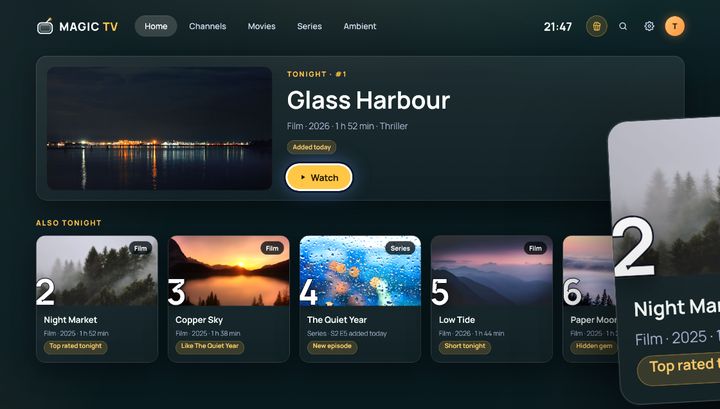
Tonight
Live programmes, new episodes and the films you already have, in one row. Not a wall of a thousand channels.
Popcorn
Choose a mood. Get one film from your playlists, not a hundred posters. Loved it? Popcorn brings more like it. Not for you? Fewer.




Ambient · free forever
For when the TV is just on. A crackling fire, rain on the window, snow, northern lights and cozy rooms - in MAGIC TV Basic, free forever, with no playlist needed.







Made for the whole home
All its copies behind one card - 4K, HD, other languages. The best one plays.
Add more than one. If one source stops, the next one plays.
Choose them once. Everything else stays hidden.
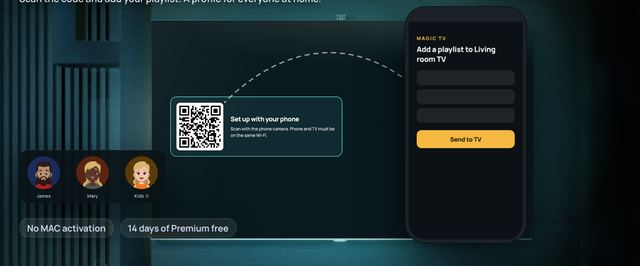
Each with its own favourites, Stash and an optional PIN.
Eclipse is true black for OLED screens.
Stored encrypted on the TV and sent only to your provider. Privacy
Setup in a minute
Scan the code on the TV, type your playlist on your phone, send it to the TV. Done.
Basic and Premium
No playlist, no card.
No card needed. Premium goes on sale with the store release.
Your 14 free days start when you add your first playlist.
Beta · 50 Founding places
We're testing on LG TVs with webOS now. Every tester gets a Founding code: MAGIC TV Premium for life, free.
Yes. MAGIC TV is a video player, like the player on your phone or computer. It comes with no channels, films or series, and we don't sell, offer or recommend any. Please only add playlists you have the right to watch.
LG TVs from 2020 (webOS 5) and newer. Samsung and other TVs come later. M3U playlists and server logins from your provider, with an optional TV guide link. Add more than one and MAGIC TV makes one channel list from them.
We don't recommend providers, because we can't vet them. Many TV operators and broadcasters give their subscribers a playlist link - ask yours.
MAGIC TV Basic is free forever: Ambient, live channels from YouTube and all 5 themes. MAGIC TV Premium adds your own playlists, Tonight, Popcorn, Stash and profiles, and is free for 14 days, no card needed. Premium goes on sale with the store release.
Works with M3U playlists and server logins from your provider, with an optional TV guide (EPG) link. LG TVs from 2020 (webOS 5) and newer; Samsung and more TVs later. MAGIC TV is a player only: it contains no channels and works with the playlists you already have.